



Before most homeowners speak to an architect, they usually have a secret collection.
A few screenshots on the phone.
A Pinterest board from 2019.
A saved Instagram post of a kitchen with beautiful light.
A photo of a friend’s hallway.
A note that says, “not too modern, but not old-fashioned either.”
This is normal. It is also useful.
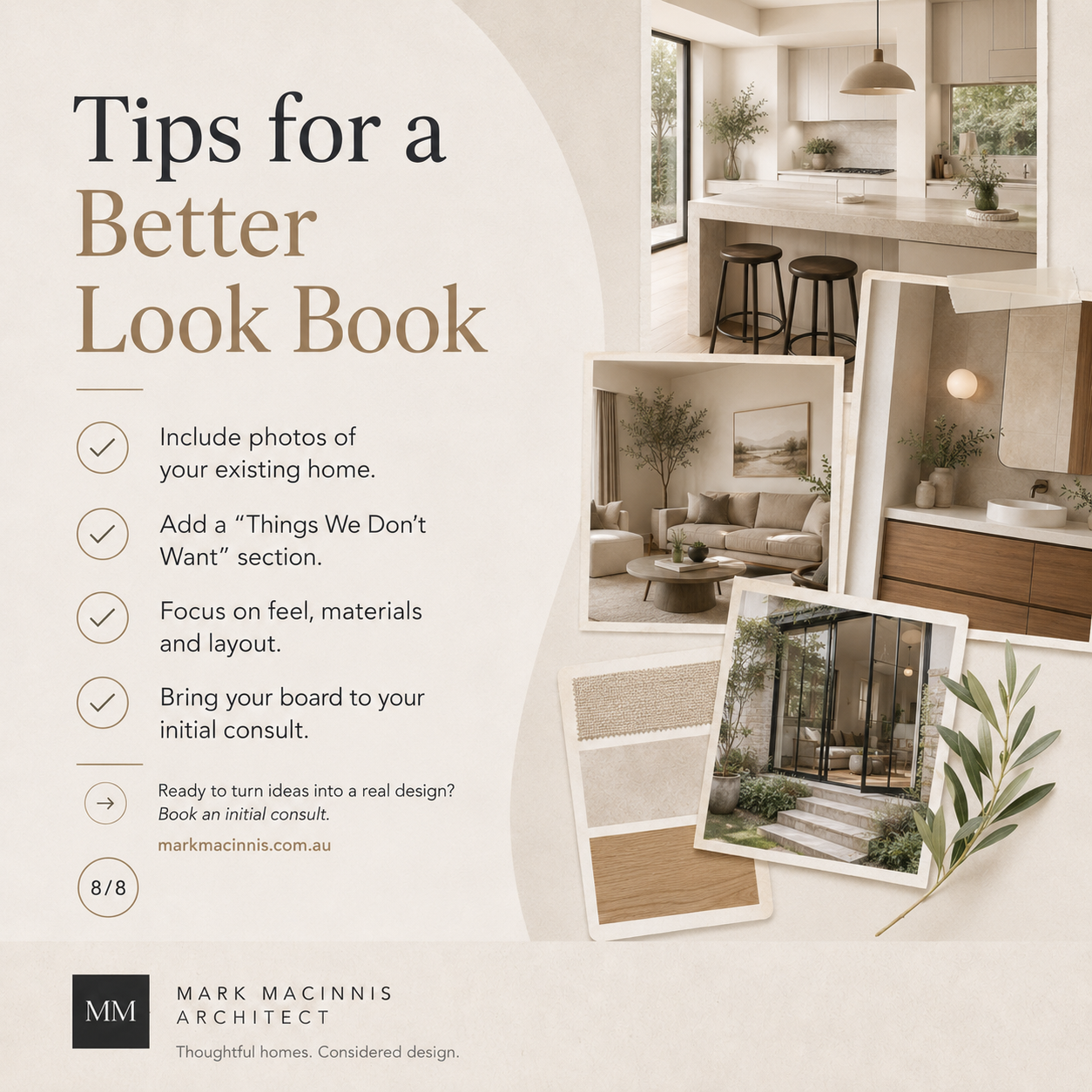
A good look book can help you explain what you want before you have the architectural language to describe it. It gives your architect a visual starting point for your renovation, extension or new home design.
But there is a catch.
A messy inspiration folder can confuse the brief rather than clarify it. One minute you are saving warm timber joinery, the next you are deep in black marble bathrooms and Tuscan courtyards. The algorithm has taken the wheel, and your renovation has become a mood-board octopus.
The goal is not to collect every nice image. The goal is to build a focused visual guide that helps your architect understand what you are drawn to, what you want to avoid, and what matters most in your home.
What is a home renovation look book?
A look book is a curated collection of visual ideas for your home project.
It may include:
Exterior styles
Kitchen ideas
Bathroom inspiration
Materials and finishes
Window and door styles
Lighting moods
Storage ideas
Garden connections
Period home details
Examples of modern extensions
Colours, textures and materials
Things you dislike
For a Melbourne renovation or extension, a look book is especially useful when you are trying to balance old and new. For example, you may want to keep the character of a Victorian, Edwardian or Californian bungalow home while adding a more open, light-filled living space at the rear.
That visual tension can be hard to explain in words. A look book helps.
Why your architect does not need 500 images
More images do not always make the brief clearer.
What your architect needs is not a giant digital haystack. They need the golden needles.
A useful look book should show patterns. After reviewing your selected images, it should become easier to identify what you consistently like.
For example:
Do you keep saving rooms with high ceilings?
Are you drawn to natural timber?
Do you prefer soft, neutral palettes?
Are you saving homes with strong indoor-outdoor connections?
Do you like traditional facades with contemporary rear additions?
Are you drawn to built-in storage and uncluttered spaces?
Do you like homes that feel calm, warm, dramatic, minimal or layered?
The pattern matters more than any single image.
A designer or architect may not copy the image, and generally should not. Instead, they use your look book to understand the feeling, priorities and design direction behind your choices.
The best tech tools for creating a renovation look book
You do not need a complex setup. Choose one main tool and keep it organised.
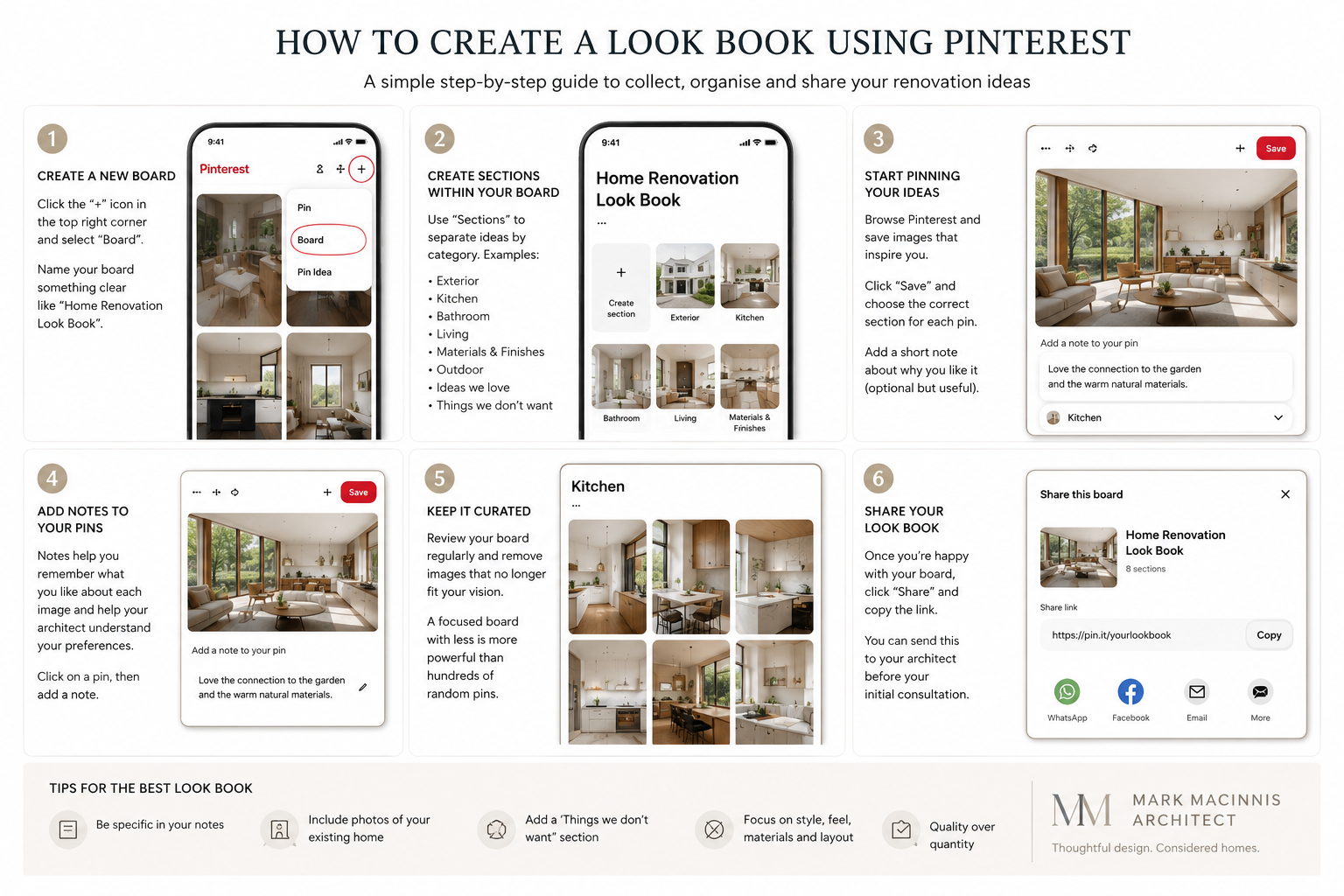
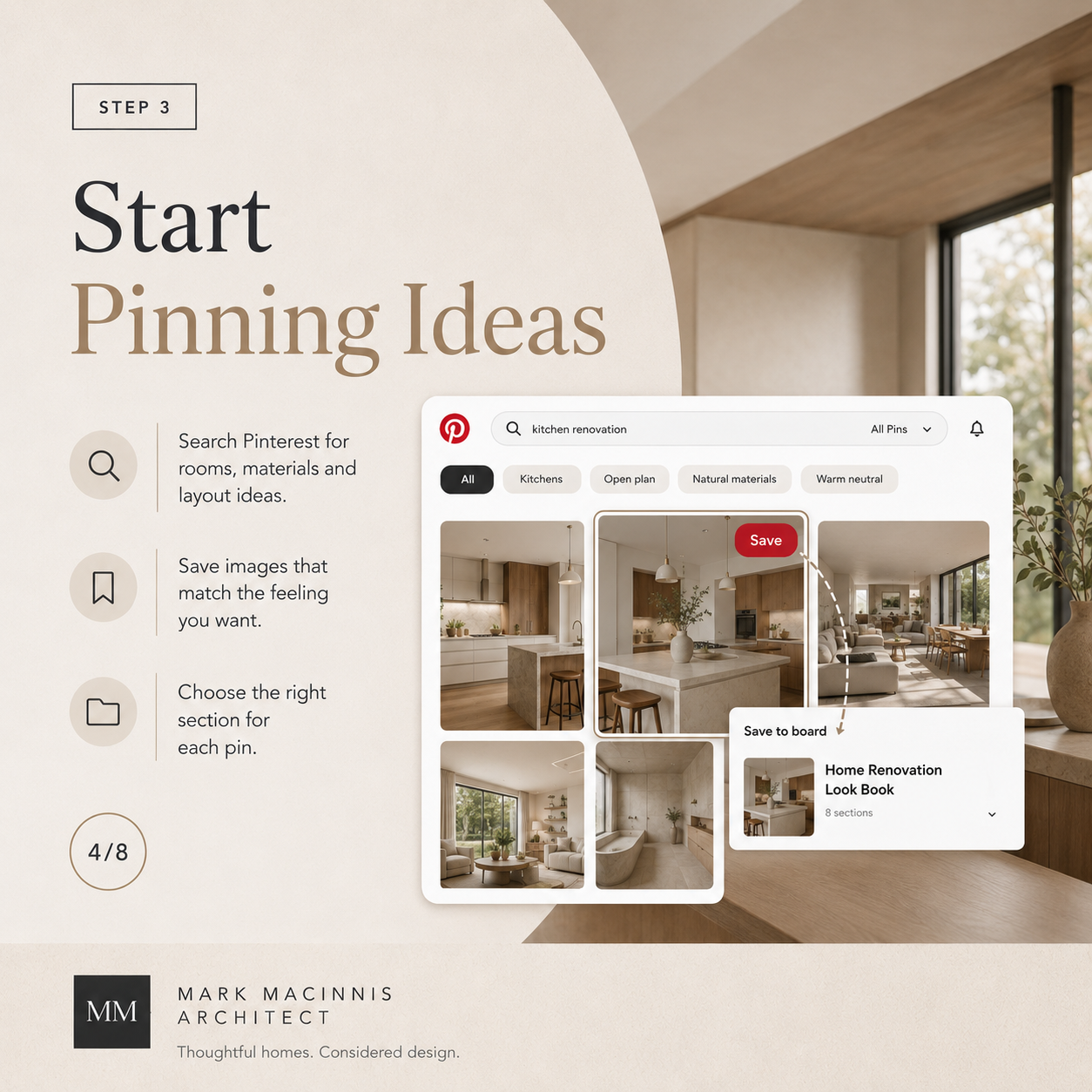
1. Pinterest for broad inspiration
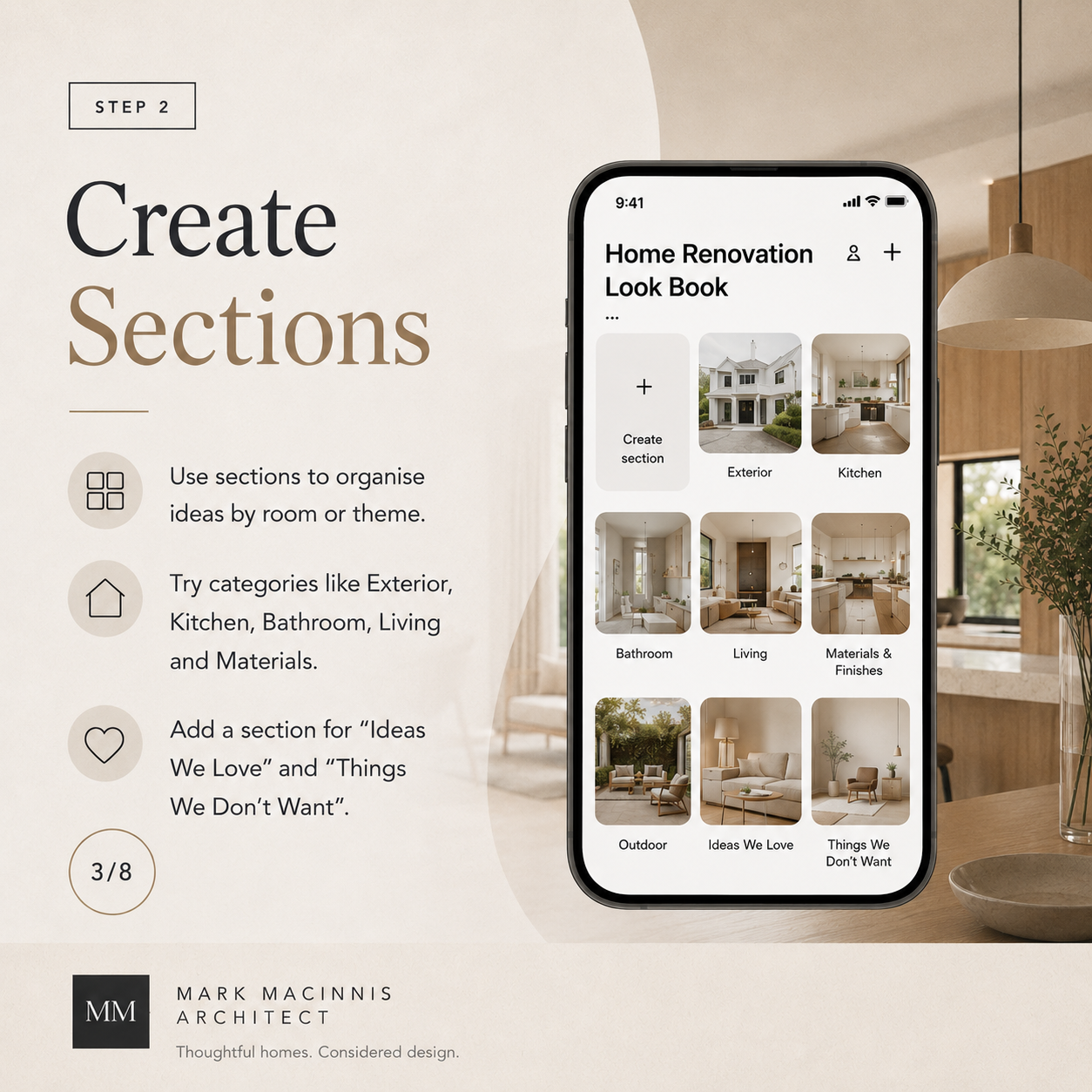
Pinterest is still one of the easiest tools for collecting home renovation ideas. It works well because you can create boards, save images quickly, and organise ideas by room or theme.
For renovation planning, create separate boards or sections such as:
Exterior
Kitchen
Bathroom
Living area
Period details
Rear extensions
Materials
Lighting
Garden connection
Things we do not want
Designers increasingly recommend treating Pinterest as an evolving archive rather than a strict shopping list. The value is in spotting repeated preferences, not copying a whole room image tile by tile.
Best for: early-stage inspiration and discovering your design patterns.
Watch out for: saving too much without editing it later.
Useful link:
https://www.pinterest.com.au/
2. Houzz for renovation and home design examples
Houzz is useful for homeowners because it is focused on homes, renovations, interiors and professionals. Houzz Australia positions itself as a place for homeowners to find inspiration and professionals for home design projects.
You can use Houzz to save ideas into ideabooks, browse renovation examples, and look at how different rooms or exterior styles are handled.
Best for: real-world renovation references and room-by-room ideas.
Watch out for: international examples that may not translate neatly to Melbourne planning, climate, block size or construction costs.
Useful link:
https://www.houzz.com.au/
3. Canva for a simple visual look book
Canva is a good option if you want something more polished and easier to share. Canva offers mood board and whiteboard templates, which can be useful for grouping ideas visually and collaborating in real time.
You can create pages such as:
Overall style direction
Exterior inspiration
Kitchen ideas
Bathroom ideas
Materials palette
Lighting mood
Must-haves
Avoid list
This can become a simple PDF to share before your initial design consultation.
Best for: turning scattered inspiration into a clean presentation.
Watch out for: making it too pretty and not practical enough. The architect needs meaning, not a wedding invitation for your benchtop.
Useful link:
https://www.canva.com/create/mood-boards/
4. Milanote for a more flexible design board
Milanote is built for visual planning and mood boards. It allows you to add images, notes, links, videos, PDFs, colour swatches and other files into a flexible workspace.
This can work well if you want to combine inspiration with comments, such as:
“We like the warmth of this timber.”
“This kitchen feels too stark.”
“Love the light, not the colour.”
“This is close to the feeling we want.”
“We want the extension to feel modern but not cold.”
Those comments are extremely valuable. Without them, your architect may not know whether you saved the image for the windows, the flooring, the ceiling height or the general atmosphere.
Best for: visual thinkers who want to add notes and organise ideas spatially.
Watch out for: overbuilding the board instead of curating it.
Useful link:
https://milanote.com/product/moodboarding
5. Google Drive or Dropbox for the practical folder
Sometimes the simplest system is best.
Create a folder called:
Home Renovation Look Book
Then create subfolders:
01 Exterior
02 Kitchen
03 Living and dining
04 Bathroom
05 Materials
06 Garden and outdoor connection
07 Things we dislike
08 Existing home photos
09 Must-have notes
This is not glamorous, but it is easy to share. It also lets you include photos of your current home, which are often more useful than another image of a $300,000 kitchen in Copenhagen.
Best for: easy file sharing and storing your own photos.
Watch out for: dumping everything in one folder with names like IMG_4729.
Useful link:
https://drive.google.com/
6. AI tools for sorting your ideas
AI can help you summarise what you like, especially if you have collected a large batch of inspiration.
You can use an AI tool to help you:
Group images by style
Write a plain-English design brief
Identify repeated preferences
Create a list of must-haves and nice-to-haves
Turn messy notes into a cleaner architect brief
Compare competing design directions
For example, you might write:
“Here are my renovation notes. Summarise the design style I seem to prefer, identify any contradictions, and turn this into a brief I can discuss with my architect.”
AI is not a substitute for architectural advice. It does not understand your site, planning controls, budget, structure, orientation or the real behaviour of morning light in a Melbourne winter. But it can help tidy the thinking before your first meeting.
Best for: clarifying messy notes.
Watch out for: letting AI invent design solutions before the site has been properly understood.
How to structure your renovation look book
The best look books are simple. Aim for clarity, not volume.
Page 1: The big picture
Start with a one-page summary.
Include:
Project type: renovation, extension, new home or second-storey addition
Suburb or general location
Home type: period home, townhouse, family home, apartment, etc.
Main goal: more space, better light, improved flow, ageing in place, entertaining, growing family
Style direction: warm, calm, refined, contemporary, traditional, layered, minimal
Budget awareness: realistic, staged, flexible or still being explored
Example:
“We want to renovate and extend our period home in Melbourne’s south-east. We like the character of the existing facade but want the rear of the home to feel lighter, warmer and more connected to the garden. We prefer natural materials, soft colours and built-in storage. We do not want the extension to feel like a glass box.”
That is already useful.
Page 2: The existing home
Include photos of your current home.
Add:
Front facade
Street view
Entry
Main living areas
Kitchen
Bathroom
Outdoor area
Awkward spaces
Areas with poor light
Things you love
Things that frustrate you
This gives the architect context before they visit or review plans.
Page 3: Exterior inspiration
For Melbourne homes, exterior inspiration is important because the relationship between old and new can define the whole project.
Include examples of:
Facades you like
Rear extensions
Window styles
Roof forms
Materials
Garden connections
Fencing or entry ideas
Heritage-sensitive details
Add notes explaining what you like.
For example:
“Like the way the new addition sits quietly behind the original home.”
“Love the timber warmth, but this feels too dark overall.”
“Like the steel-framed doors, but we want something softer.”
Page 4: Interior mood
This page should capture the feeling of the home.
Include images that show:
Natural light
Ceiling height
Flooring
Wall colour
Joinery
Furniture mood
Texture
Warmth
Openness
Calmness or drama
Avoid making this only about furniture. Your architect is more interested in the spatial qualities behind the image.
Page 5: Kitchen and living
For many renovation projects, the kitchen, dining and living area is the emotional headquarters of the brief.
Include examples of:
Kitchen layouts
Island benches
Pantry ideas
Dining connections
Living room flow
Built-in joinery
Doors to the garden
Window seats
Storage ideas
Add practical notes:
“We cook most nights.”
“We need space for teenagers.”
“We entertain casually.”
“We want the kitchen to connect to the garden.”
“We do not want the sink on the island.”
These comments are gold.
Page 6: Bathrooms and utility spaces
Bathrooms, laundries and mudrooms are often where budget and function need discipline.
Include:
Vanity styles
Tile direction
Lighting ideas
Storage
Shower preferences
Bath or no bath
Laundry functionality
Powder room mood
Be clear on what is essential and what is decorative.
Page 7: Materials and finishes
This is where your look book becomes more useful.
Include:
Timber tones
Stone or benchtop references
Brick
Concrete
Tiles
Paint colours
Metal finishes
Cabinetry colours
Textures
Try to show combinations, not just isolated pretty things.
A renovation mood board should balance inspiration images with practical materials and finishes, because the look needs to work in your actual home, not only in a saved image.
Page 8: The “not this” page
This may be the most underrated page in the entire look book.
Include examples of what you do not want.
For example:
Too white
Too dark
Too glossy
Too industrial
Too coastal
Too ornate
Too cold
Too open
Too trendy
Too much black steel
Too much visible clutter
This saves time. It also prevents polite design confusion, where everyone nods while secretly imagining different houses.
A simple system: collect, sort, edit, explain
Use this four-step process.
Step 1: Collect freely
For the first stage, save everything that catches your eye.
Do not overthink it. Use Pinterest, Instagram saves, Houzz, screenshots, Canva, Milanote or a folder.
Step 2: Sort by category
Move ideas into categories:
Exterior
Interior mood
Kitchen
Bathroom
Materials
Storage
Garden connection
Avoid
This makes the collection easier to understand.
Step 3: Edit ruthlessly
After a week or two, remove anything that no longer fits.
A strong look book is curated. If you have 200 kitchen images, choose the 10 that best represent your direction.
Step 4: Add notes
For each key image, write one sentence explaining what you like.
Use this format:
“We like [specific element] because [reason].”
Example:
“We like the timber ceiling because it makes the modern extension feel warmer.”
That one sentence is more useful than the image alone.
What not to do with your look book
Do not expect your home to look exactly like the images
Most inspiration images come from different sites, climates, budgets, eras and construction contexts. They are references, not recipes.
Do not mix too many styles
A little contrast is good. Total style soup is not. If your board includes Paris apartment, Byron Bay retreat, Japanese ryokan, industrial warehouse and farmhouse kitchen, your architect may need a compass and a chair.
Do not hide the practical problems
Include the ugly bits. Poor light, bad storage, awkward bathrooms, strange additions and tired rooms are all important.
The problem areas often reveal the real brief.
Do not forget lifestyle
A home is not a showroom. Add notes about how you live.
Do you work from home?
Do you entertain?
Do you have children or teenagers?
Do you need quiet zones?
Do you garden?
Do you want to age in place?
Do you have pets?
Do you need storage for sports gear, bikes or tools?
This helps the design respond to your life, not just your taste.
A useful look book template for homeowners
Here is a simple structure you can use.
SectionWhat to includeWhy it helpsProject summaryWhat you want to achieveGives the architect the big pictureExisting homePhotos and pain pointsShows the real starting pointExterior ideasFacades, extensions, materialsHelps define the old/new relationshipInterior moodLight, texture, colours, atmosphereCommunicates the feeling you wantKitchen/livingLayouts, storage, garden connectionClarifies the heart of the homeBathroom/laundryFixtures, tiles, storage, functionKeeps practical areas focusedMaterialsTimber, stone, tile, paint, brickShows your preferred paletteAvoid listStyles and details you dislikePrevents wrong turns earlyMust-havesNon-negotiablesHelps prioritise decisionsNice-to-havesFlexible wishlist itemsSupports budget conversations
How Mark MacInnis Architect can help
A look book is a helpful starting point, but it is not the design.
The architect’s role is to translate your ideas into a home that responds to your site, your budget, your council constraints, your existing building and the way you actually live.
Mark MacInnis works with Melbourne homeowners who want thoughtful renovations, extensions and new homes. A clear look book can help make the first conversation more productive, especially when you are trying to explain a feeling that words alone cannot quite capture.
Mark can help you move from:
“We like this kind of thing”
to “This is the right design direction for your home, site and brief.”
That is where the real value begins.
Final thought: your look book should start the conversation, not finish it
Technology makes it easier than ever to collect renovation ideas.
But the real skill is in editing those ideas into something useful.
A good look book does not need to be perfect. It needs to be clear enough to show what you value, what you are drawn to, and how you want your home to feel.
From there, a good architect can help turn the digital scraps into a considered, liveable and buildable design.
Planning a renovation, extension or new home in Melbourne?
Book an initial consult with Mark MacInnis Architect and bring your look book, sketches, screenshots or beautifully chaotic idea-folder with you.